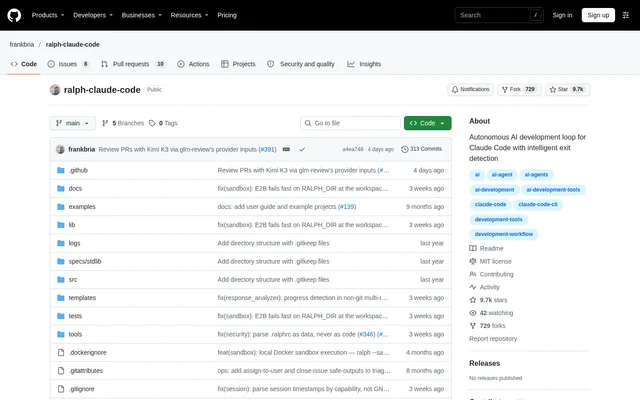
What is Ralph for Claude Code?
Ralph for Claude Code is an open-source autonomous development loop for developers using Claude Code. Ralph for Claude Code repeatedly runs Claude Code against project requirements so development can continue across iterations until completion. The repository describes the project as an implementation of Geoffrey Huntley's technique and distributes the code under the MIT license.
Ralph for Claude Code combines continuous execution with safeguards intended to prevent infinite loops and API overuse. The repository lists core functionality as working and tested while identifying the project as under active development. Broader support for other headless coding command-line tools is described as work in progress rather than an available capability.
What Ralph for Claude Code can do
Ralph for Claude Code combines task execution, progress visibility, and execution controls. The available features cover project preparation, repeated coding sessions, monitoring, and isolated execution. Configuration files provide project-specific settings and tool permissions, while response analysis and error detection help determine whether development should continue, stop, or recover from a problem.
- Ralph for Claude Code requires completion indicators and an explicit EXIT_SIGNAL before detecting completion.
- Ralph for Claude Code preserves context across iterations through session management.
- Ralph for Claude Code imports tasks from PRD documents, GitHub Issues, and beads.
- Ralph for Claude Code exposes live output, monitoring dashboards, logs, and loop metrics.
- Ralph for Claude Code supports isolated execution through Docker and E2B sandboxes.
- Ralph for Claude Code simulates loops without API calls through dry-run mode.
How Ralph for Claude Code works
Ralph for Claude Code uses a global installation followed by per-project setup. Developers clone the GitHub repository, enter the repository directory, and run ./install.sh. Installation adds commands for running loops, monitoring execution, creating projects, importing requirements, and enabling existing projects. The ralph-enable wizard guides existing-project configuration, while ralph-enable-ci provides a non-interactive option for automation.
Ralph for Claude Code stores project settings and tool permissions in .ralphrc. The setup wizard detects project environments, selects a task source, configures settings, generates files, and verifies setup. During execution, configurable rate limits, session expiration, response analysis, and a circuit breaker control the loop. Optional live streaming shows Claude Code activity as execution proceeds.
Who Ralph for Claude Code is for
Ralph for Claude Code is intended for developers who want Claude Code to work iteratively from project requirements and prioritized tasks. Existing repositories can use the enablement wizard, while new projects can use project templates. Non-interactive enablement and GitHub Actions support also make the project relevant to developers configuring automated development workflows.
- Ralph for Claude Code can turn PRD documents into development task inputs.
- Ralph for Claude Code can import GitHub Issues using metadata filters and selection options.
- Ralph for Claude Code can monitor ongoing coding work through logs and live output.
- Ralph for Claude Code can run coding sessions in isolated Docker or E2B environments.
Ralph for Claude Code licensing and access
Ralph for Claude Code is available as an open-source GitHub repository under the MIT license. The documented access path is repository cloning and local installation rather than registration for a hosted application. Installation makes commands available globally, and developers then configure individual projects. The repository also includes a dedicated uninstall script for removing the installed commands.
Ralph for Claude Code strengths and limitations
Ralph for Claude Code provides several controls around autonomous execution rather than relying only on repeated prompts. Explicit completion signals, rate limiting, circuit breaking, session management, and monitoring give developers ways to manage ongoing work. Global commands and reusable project setup support use across repositories, but the documented workflow still requires command-line installation and project configuration.
- Ralph for Claude Code remains under active development.
- Ralph for Claude Code requires local installation and per-project setup.
- Ralph for Claude Code lists multi-provider agent support as in progress.
Ralph for Claude Code FAQ
What is Ralph for Claude Code?
Ralph for Claude Code is an open-source autonomous development loop that repeatedly executes Claude Code against project requirements. Ralph for Claude Code includes session continuity, completion detection, rate limiting, and circuit breaking to support iterative development while limiting runaway execution.
Is Ralph for Claude Code open source?
Ralph for Claude Code is an open-source project distributed through GitHub under the MIT license. Ralph for Claude Code is obtained by cloning the repository and running the installation script, followed by configuration for each development project.
How does Ralph for Claude Code know when to stop?
Ralph for Claude Code uses a dual-condition exit gate requiring both completion indicators and an explicit EXIT_SIGNAL. Ralph for Claude Code also includes a circuit breaker and response analysis to detect problems and help prevent development loops from continuing indefinitely.
Can Ralph for Claude Code import GitHub Issues?
Ralph for Claude Code supports GitHub issue import through ralph-import --github-issue. Ralph for Claude Code provides metadata filters for labels, title, assignee, milestone, and state, alongside selection options and a dry-run preview. Task imports also support PRD documents and beads.
Does Ralph for Claude Code support sandbox execution?
Ralph for Claude Code supports Docker sandbox execution and E2B cloud sandbox execution. Docker support includes resource limits, network policy, and secure credential handoff, while E2B support includes file synchronization, session recovery, and cost tracking.
How do you install Ralph for Claude Code?
Ralph for Claude Code is installed by cloning the GitHub repository, entering the repository directory, and running ./install.sh. Ralph for Claude Code then provides global commands, with ralph-enable available for interactive setup in existing projects and ralph-enable-ci for non-interactive configuration.
From the community
No reviews yet
Be the first to review this tool. What you write helps the next person choose.