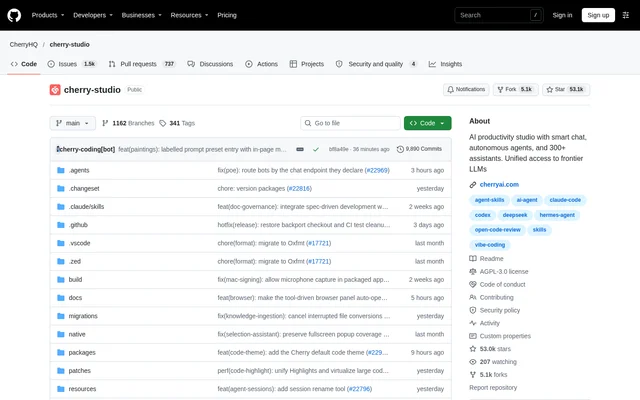
What is Cherry Studio?
Cherry Studio is an open-source AI workstation for Windows, macOS, and Linux that combines conversations, agents, knowledge bases, image creation, and everyday automation. Cherry Studio supports people who want to work with multiple AI models and tools in a shared desktop workspace, including cloud services and locally running models.
Cherry Studio Community Edition is governed by AGPL-3.0, with commercial use permitted under the license terms. Cherry Studio also offers an Enterprise Edition for teams and organizations, with centralized model management, shared knowledge bases, employee access controls, and private deployment options. A related mobile version is available for iOS and Android.
What Cherry Studio can do
Cherry Studio combines model access with tools for working on files, documents, images, and recurring tasks. Cherry Studio agents can have their own instructions, workspaces, models, and tool permissions. Conversations support rich responses with Markdown, highlighted code, formulas, Mermaid charts, and exports, while knowledge bases provide sources for retrieval and agent workflows.
- Cherry Studio compares responses from multiple models in one conversation.
- Cherry Studio agents work with files, run commands, and use browser and computer automation tools.
- Cherry Studio extends agents through Skills, MCP servers, scheduled tasks, and messaging Channels.
- Cherry Studio builds local knowledge bases from files, folders, and web pages.
- Cherry Studio processes PDF files, Office documents, images, and text with OCR options.
- Cherry Studio generates and edits images with supported image models.
- Cherry Studio supports translation, speech recognition, and text-to-speech.
How Cherry Studio works
Cherry Studio provides a desktop download and getting-started documentation. Users configure services, API keys, and models in the model provider interface. Supported connections include OpenAI, Anthropic, Gemini, and custom compatible services, while Ollama and LM Studio provide access to local models. Users can then customize assistants, create agents, or add sources to knowledge bases.
Cherry Studio keeps conversation history and knowledge bases on the user's device and offers local and WebDAV backup options. Cherry Studio also opens web-based tools through Mini Apps and provides an API Gateway for connecting other applications to configured models. Setup requirements vary: some capabilities need credentials, downloaded models, additional dependencies, or system permissions.
Who Cherry Studio is for
Cherry Studio serves people using AI for conversations, document work, creative tasks, and automation. Cherry Studio's combination of model comparison, source retrieval, translation, and file handling supports workflows that cross several types of content. Cherry Studio Enterprise Edition addresses teams and organizations that need shared resources, employee access controls, or private deployment.
- Cherry Studio helps users compare model responses while exploring ideas.
- Cherry Studio supports document workflows using local knowledge bases and OCR options.
- Cherry Studio supports recurring work through scheduled agent tasks.
- Cherry Studio supports image creation and text or document translation.
Cherry Studio pricing and plans
Cherry Studio Community Edition is an open-source project licensed under AGPL-3.0. Commercial use is permitted when users comply fully with the license terms. Cherry Studio offers a separate commercial license for those requiring an exemption from AGPL-3.0 requirements. Enterprise purchasing, pricing, and demo inquiries are handled through [email protected]; the repository does not list Enterprise prices.
Cherry Studio strengths and limitations
Cherry Studio combines cloud and local model access with agents, knowledge bases, creative tools, and device-based storage. Cherry Studio's desktop support spans Windows, macOS, and Linux, and the Community Edition's source is available under AGPL-3.0. These capabilities come with configuration considerations rather than a guarantee that every model or tool works in every environment.
- Cherry Studio model and tool availability depends on the provider, operating system, and configuration.
- Cherry Studio features may require API credentials, downloaded models, dependencies, or system permissions.
- Cherry Studio community themes require version compatibility checks before installation.
Cherry Studio FAQ
What is Cherry Studio?
Cherry Studio is an open-source AI workstation for Windows, macOS, and Linux. Cherry Studio combines multi-model conversations, agents, local knowledge bases, image creation, translation, and everyday automation in a desktop workspace.
Is Cherry Studio free?
Cherry Studio Community Edition is available as an open-source project under AGPL-3.0. Commercial use is permitted subject to license compliance. Cherry Studio also offers Enterprise Edition pricing and separate commercial licensing by contact; some features require external API credentials or downloaded models.
Can Cherry Studio use local AI models?
Cherry Studio supports local models through Ollama and LM Studio, alongside cloud providers such as OpenAI, Anthropic, and Gemini. Cherry Studio model availability depends on configuration, and some capabilities require downloaded models or additional dependencies.
Does Cherry Studio support MCP and integrations?
Cherry Studio supports MCP servers and Skills to extend agent capabilities. Cherry Studio also connects agents to messaging platforms through Channels and provides an API Gateway that lets other applications connect to configured models.
Can Cherry Studio work with documents and knowledge bases?
Cherry Studio builds local knowledge bases from files, folders, and web pages for use in conversations and agents. Cherry Studio processes PDF files, Office documents, images, and text, with OCR and document processing options.
Does Cherry Studio have an Enterprise Edition?
Cherry Studio Enterprise Edition provides centralized model management, shared knowledge bases, employee access controls, and private deployment options for teams and organizations. Cherry Studio directs purchasing, pricing, and demo inquiries to [email protected].
From the community
No reviews yet
Be the first to review this tool. What you write helps the next person choose.